If you are using my linkage outlined in Triggering Homeseer from Blue Iris And are looking for way to grab the Blue Iris data for a sheet (I have a sheet that allows me to check which devices are using in events, scripts and by Blue Iris) then you might want to look at this script.
Note I have 4 servers now as I've been upgrading cams again.
Also note you will need linux or a linux command line tools package like Cygwin for this shell script
From regedit I export [HKEY_LOCAL_MACHINE\SOFTWARE\Perspective Software\Blue Iris\Cameras] to the hostname.reg in the folder with the script.
Download it from here if you have trouble copying it to a file. Change the orange bits to match your set up. Note ^M is a control M
rm -f cams.csv
echo host,shortname,dsname,fullxres,fullyres,HS3ref,vcodec,folder,enabled,group >
cams.csv
set -x
for host in BlueIris2 BlueIris3 BlueIris4 BlueIris5
do
iconv -f UTF-16LE -t UTF-8 ${host}.reg | grep -E "\"enabled\"|\"group\"|shortname|dsname|fullxres|fullyres|&value=3|\"vcodec\"|\"folder\"" | sed -e "s|10.10.1.45/JSON?user=userName&pass=P@ssw0rd&request=controldevicebyvalue&ref=||g" | sed -e "s|&value=3||g" > ${host}.raw
echo ======== Raw =========
cat ${host}.raw
echo ======== Raw =========
## remove unneeded stuff and add missing fields from Tinycam
cut -f2-20 -d'=' ${host}.raw | sed -e "s|^M||g" | sed -e "s|cameraId=1538607685:1\"|cameraId=1538607685:1\"\ndword:00000280\ndword:000001e0|g" | sed -e "s|dword:||g" > ${host}.tmp
echo ======== Tmp =========
cat ${host}.tmp
echo ======== Tmp =========
fmt="$host,%s,%s\\n"
awk -v fmt="$host,%s,%s,%s,%s,%s,%s,%s,%s,%s,%s,%s,\\n" '{getline b;getline c;getline d;getline e;getline f;getline g;getline h;getline i;getline j;getline k;getline l;getline m;getline n;getline o;getline p;getline q;getline r;printf(fmt,c,d,e,f,g,h,$0,p,q,r,b)}' ${host}.tmp 2>&1 >> cams.csv
echo ======== Cams =========
done
cat cams.csv
It outputs cams.csv which Excel and such can open as a sheet. I uploaded an example here.
Showing posts with label Blue Iris. Show all posts
Showing posts with label Blue Iris. Show all posts
Monday, April 1, 2019

Saturday, November 10, 2018
Triggering Homeseer from Blue Iris
Using MyMonitor is is more reliable and more automatic than just using trigger URLs but using triggers URLs is quick and simple.
First you need a virtual object to update. An easy way to do this is using the createMonDev method in MyMonitor.vb call it from an event with Parameters of Name,type like
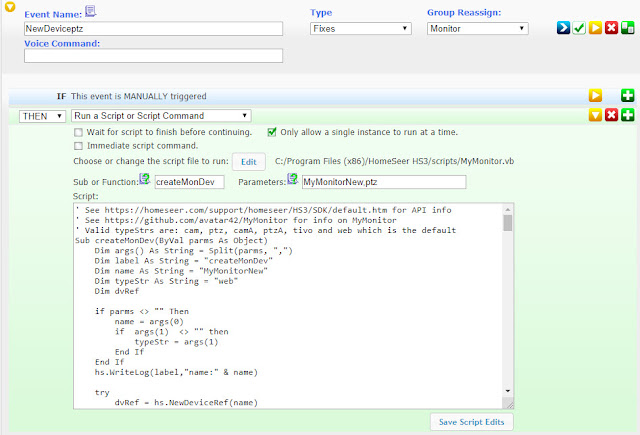
This gets you a device similar to this
 Note this a full MyMonitor object. If you are just using trigger URLs you only need status for values 0, 3 and 4. Note the ref ID of the object created http://10.10.1.45/deviceutility?ref=5596&edit=1
Now open the camera properties and set action on the Alerts tab for the profiles you use
Replace the bits in yellow with the value for your setup.

The URLs are set via Configure

Now set the Watchdog URLs


First you need a virtual object to update. An easy way to do this is using the createMonDev method in MyMonitor.vb call it from an event with Parameters of Name,type like

This gets you a device similar to this

Now open the camera properties and set action on the Alerts tab for the profiles you use
When triggered
HS_IP/JSON?user=USERNAME&pass=PASSWORD&request=controldevicebyvalue&ref=5596&value=3
When reset
HS_IP/JSON?user=USERNAME&pass=PASSWORD&request=controldevicebyvalue&ref=5596&value=4

The URLs are set via Configure

Now set the Watchdog URLs
Watchdog triggered (offline)
HS_IP/JSON?user=USERNAME&pass=PASSWORD&request=controldevicebyvalue&ref=5596&value=0
When reset
HS_IP/JSON?user=USERNAME&pass=PASSWORD&request=controldevicebyvalue&ref=5596&value=4
If you want to go the other way (trigger cameras from Homeseer) look at this post in my camera blog.
Subscribe to:
Posts (Atom)