Showing posts with label IFTTT. Show all posts

Friday, December 20, 2019

Alexa still not an entry level hub replacement

I was writing up a response to someone about IFTTT and Alexa / Wireless Tag integration which will probably but useful later so I'm saving it here as it reflects on Alexa's poor support for sensors. Note Alexa's home automation interface is still better than Google's almost non existent one. (See compare below.)

Why go through IFTTT when you can integrate Wireless Tags direct with Kumo? As in as in my fridge / freezer monitoring setup which updates values as they change in my Homeseer instance which then can trigger any action Homeseer can perform. Which is just about anything. Plus IFTTT was become very unreliable this year.

Alexa Wireless Tag integration sort of works. I can ask the temperature of a sensor for example, "Alexa, what is the temperature of the freezer" and it tells me the reading from my regular sensor in the freezer. Though oddly in the device list I only see motion values for the regular tags and what appears to be temperature for the soil moisture tags. (Not all my soil moisture tags are dead.) Again oddly you can't use the sensor values in routines. Though finding anything in the Alexa device list is almost impossible since it is designed for people the just have a few things. Even stranger:

  • You can sort the device list in the web interface but not the android one. 
  • The web interface does not let you do anything with the devices on the list other than forget the device.
  • Routine management is missing from the web interface.
  • The android list interface does have some groups to narrow down the list but way to few. For example, the only way to see a list of the 12 of my 348 devices Alexa sees as "sensors" is to try to create a routine with one. 
  • My Homeseer sees 3137 "devices" as I write this. (Note a "device" is data stream or parent. As in a Hue Sensor would be seen as 5 "devices". A parent and 4 sensors, light level, temperature, motion and battery level.) Alexa only sees 348 of those (note some of the 348 are Alexa devices not in the Homeseer count) and only 12 of those as sensors from SmartThings, Wyze, Ring and Hue so far. Even then for example the Hue sensors report motion, temp and light gut Alexa only sees motion info.
  • Lack of complex triggers. For example: if no motion has been detected and door opens, turn on light. If motion has been detected and door opens turn off light. Or if any of room motion sensors are tripped reset occupancy timer. When occupancy timer hits X minutes turn off everything in room.


When you have 348 devices (that Alexa sees) like I do, it is almost useless. Amazon REALLY needs to improve their interface so it can scale if they want people to use their routine framework for any logic. So while it would be nice to have Wireless Tags usable as sensors in Alexa to, for instance, announce the fridge is too warm, I do not really see it as big deal till Amazon makes their configuration interface more usable.

To be fair when Alexa is compared to Google's Home:

Cons:


  • Google does not even have a web interface so everything must be done via phone or tablet.
  • Often skills like Harmony where with Alexa you would say "Alexa, turn on Netflix". With Google that worked then it went to you had to say "Hey Google, Ask Harmony to turn on Netflix." and then often tells me it did not recognize me and would not do it. Now it seems to be back to just "turn on" BUT for instance when I say "turn on Hero" (my PC's name) to Alexa is just works. I say "turn on Hero" to Google it starts playing something from Pandora.
  • It appears too that at some point Google Home lost some of the account links I had setup.


  • Lately the Googles (I have a Home and 3 minis) seem to say try again in a few seconds a lot.
  • To discover new devices you say "Alexa, discover devices." You say this to Google and it finds phones and asks if you want to ring them. Ask "how do I get you to discover devices", you get "I don't understand" and "I found a related how to get Alexa to discover devices"! It is also easy to do from the Alexa app with a swipe down. Instructions I found online say Google's Home should do that too but it appears to do nothing for me.
  • Google appears to allow one Harmony hub to be connected while Alexa allows many. (I have 5 currently)
  • Adding skills to Home is an egg hunt compared to Alexa. I just tried to add the Wyze skill for example and I had to search on line to even figure it out. Then while trying to link the account it just exited half way through me entering my login info.
  • WyzeAlexa sees all the cams, motion and contact sensors I have. Google sees on the cameras and contact sensors.
  • Google routines still appear to be voice command triggered only while Alexa's allow triggering using voice, time, some sensors (see above), location, alarms, echo button presses and "Guard state".

Pros:

  • The devices list in Google does seem to use the room from Homeseer. However I had to add each Wyze and Wireless Tag device to a room during the setup process manually. 

Saturday, May 11, 2019

Is the cloud over? (And some related EOL issues.)

I posted the other day how IFTTT has been getting damn iffy lately and services have been changing and going under so I though maybe a list might be in order. At least the ones I know of.

Back on September 18, 2015 I started a Facebook group for the people affected by FitBit deciding to discontinue support for custom trackers and even a couple non custom ones with little notice and no way to export that data. I scrambled and built a scrapper for people to get their data off before they shut down the pages. Fitbit eventually added the custom trackers to their data export a while after they shut them down but everyone that had been using those trackers had to find a new service to use. Generally at a higher cost. 


Since then this what I've seen / dealt with:


Sleep Tracking Startup Zeo Says Goodnight

Awesome device just poorly marketed. Technically they went under in 2013 but people the app still worked and you could still buy them as late as 2016. I got mine from the bankruptcy reseller while there seems a possible comeback. There was some effort buy users to support and enhance the app and make replacement bands. Looks like there might even be a couple bands on eBay yet. Basically dead as a product not though.

Lowes' Iris vapor API and devices that never came 2014

I bought one of the v1 hubs in the home security bundle only to find most of the devices on display in the store and on the website were not actually available. IT also turned out you could not do much of anything without a monthly subscription. The company often talked about the coming API but it never appeared.

Lowes' Iris forced conversion from v1 to v2 2015

A few things that glossed over were:
You had to "upgrade"
You had to give them a credit card and sign up for a subscription to do the upgrade.
A lot of the v1 sensors and devices where not supported by the v2 hub.
And some other things pointed out by users.


Google Drive downsize sort of upgrade 2015

I bought a Chromebook Dec 2014 that came with a TB of Google Drive space. Instead of adding a year of service on they added a second TB of space. I had almost 1 TB of used space on Drive at that point so that was great. Over the next year I added about 500 GB more thinking I could just pay for both after the free year was up. But instead my option was to remove 500+ GB or pay for 10 TB which was alos 10 times the price. So I scrambled to research for the best alternative and then moving ~600 GBs to Amazon. Also about this same time they came out with a new version that you still had to switch back to the older legacy version to use some features.

Safety Recall of all Basis Peak watches 2016

Loved this. You could download temp and heart rate data at 5 minute intervals. But they had a few batteries go bad back before that was such a common thing and they panicked. At least they refunded everyone that sent it back before the service shutdown. I wore mine up about the last day I could. As I recall I kind of made out on this one as I got mine refurbed, wore it a good year before getting more than I paid for it back.

Withings to Nokia and back again. 2016-2018

Nokia acquired Withings in 2016 and then sold it back in 2018 causing ripples in service.

Charter Communications Merges with Time Warner Cable 2016-2019

Being able to log into partnered sites like AMC.com where messed up for a long time.

Crashplan deciding to ditch the home market. 2017

They suggested people either move to a business plan at a higher cost or go to Carbonite which I left for Crashplan because their app kept resetting before I could get my data up there. Fortunately they honored plans already paid for and I had about 2 years paid ahead at that point so it was not total panic but the Home plan had been unlimited for multiple PCs. The business plan wa my the TB. I had ~ 5 TB on there so my prices was going to go up about 5 times.

Amazon ends its unlimited cloud storage plan 2017

Got Drive files moved to Amazon and notified people of the new locations to find their files (house concert footage of local bands I recorded for them). Since the plan was 
unlimited I started backing up files going to Crashplan there too. Was close to getting about 4 TB up there when they announce they would be switching to 1 TB for the same price unlimited had been. So again I was looking at a 5 X jump to stay.


Google Voice half upgrade ~2017

Around this time they also "upgraded" Google Voice. Again you had to switch back to the old version to do some tasks and still need to now in 2019.

Wunderground devolution 2017-?

It seems to have started a bit after IBM acquired The Weather Channel who had acquired Wunderground in 2012.  They started redesigning the site. It seems after a while they decided to start dropping features instead of rewriting them. My first personal issue was not being able to get my Netatmo station linked to my account. Things really went downhill when they tried to shutdown webcam support. The backlash was so intense they changed their mind on that one at the last minute. Since then though they seem to be pushing nightly builds without any testing as bugs will appear, go away and then come back. And features seem to keep going away. The latest announced feature drop, as of this writing, is dropping the free tier version of API key. This really impacted the home automation communities.

G+ shutdown 2018

After jamming G+ into all their apps then ignoring it they decided to rip it back out which required creating profiles in some apps and other issues like circles going away in Voice. Not to mention needing to convert all the posts there to a new platform or lose them.

SmartThings / Samsung merger mess 2018-?

Samsung decided to merge SmartThings account with their by making them convert to Samsung accounts and new apps. This after SmartThings had already required people to start over when "upgrading" from a version 1 hub to a version 2. No migration plan like other hub.

LinkedIn did similar after buying Lynda.com merging users basically by having the Lynda users match up and link their private LinkedIn accounts to the company provided Lynda.com accounts or creating public LinkedIn profiles to use Lynda.com.

Amazon Wand 2018

While technically still alive and even for sale but these were never supported all that well and it is a rare day now they can even get a connection to a server.

Facebook stops automated posting 2018

Affected IFTTT applets made the news but it also hit other third party integrations.

Gmail / IFTTT split 2019

IFTTT being able to trigger on an email was how a lot of things worked so while it was just a subset of features in terms of usage it was major.

Beddit Cloud shutdown 2018

Mine actually died shortly before this so it was not as big a deal but still needed to scramble yet again to save what data I could. On the plus side Withings came out with a similar but better device recently that works pretty good.

Scanadu to shut down support for its Scout device per FDA regulation and customers are mad 2016

Not a great device but had promise. Unfortunately they basic just dumped it on customers then moved on to the next thing without ever collecting any feedback or anything.

Microsoft HealthVault service to end November 20, 2019


Google said it would kill its Works with Nest program 2019

Google acquired Nest back in 2014. Tried to sell it off in 2016. And now appears to be trying to boost their Google Home Hub by make it THE Nest gateway.

Near misses

Things I thought about investing time and or money in but did not really get the chance.

Nest is permanently disabling the Revolv smart home hub 2016 

Fortunately I did not add this one to the hubs I tried.

Jawbone 2017

Mine died fairly quickly so I'd already returned it for refund so dodged this one.

Lighthouse cam 2018

At least they offered refunds

Lowes' Iris v2 shutdown 2019

Since I'd already given up on Iris at this point it made little difference to me personally.

Jibo 2019

Again at least they offered refunds
Was just starting with this one to see if could replace IFTTT when they announced it was shutting down.

HealBe soon

Still sort of around though after Globe 1 shocking people and them dying left and right the company is all but dead. Surprisingly they have a third version supposedly coming out but reviews are not great for V2 and V3

And then there also is

The above of course does not include all the crowd funded things that either never shipped or shipped something late and basically non functional. Though I did originally get some of them via crowd funded projects. 
And all the price hikes. Streaming services spring to mind. Hulu dropping the free (commercial supported) tier for example.

Updates:


Dakota Alert discontinues the 2500 series Jan 19th 2019

They replaced it with a 4000 series that while having a bit more range of course will work with any older sensors and does not have a relay per channel like the 2500 receiver did. I have a whole post on this one.

5/28/2019, Automatic forcing users to get new hardware that requires $5/month or $50/year subscription service by August 31, 2019. 

Also requires new app, works with direct cell service connection instead of your phone and it appears does not support interaction with other apps quite yet. Technically you can use it up to 3 years for free but with virtually no features other than as an OBD2 reader. Reviews of the new model appear to be awful. The one bright spot is that they are cheaper and Automatic seems to be giving a discount to upgrade directly through them. Per emails going out you can get the new model for $60. $40 off the MSRP but just $20 off the Amazon price. ($26.59 if you include taxes in my case.) If you compare the subscription fee to other services like Hulu or G-Suite for example it seem a bit steep for what you get. Sadly compared to similar products it is actually on the cheap side. Of course if you live outside the city limits like me where cell service much less LTE service is spotty any of the cell connect only models may be of limited value. So I'm going to break down like I'm sure so many other will and get one at the "upgrade" to at least try before possible having to scramble in August to find something else. 

Update Just a year later Automatic shuts down all operations.

6/29/2019 Hue app splits into 2 versions along with v1 hub EOL.

I went into the Hue app last night to check something and found it not longer works with my v1 hubs. Seems last April for some reason they decided that creating a new v1 app was the best way to provide support for v1 hubs till they shutdown support April 30th 2020. So to continue to use my 3 v1 hubs with my phone I have to set them up all over again. And next April they may stop working anyway unless I upgrade them to v2s. I appears there is or was a migration option.  Though that seems to need the phone app to see both v1 and v2 hubs. Then too the v1s were only out 5 years so one has to wonder how long the v2s will be supported. I've ordered a v2 hub to try to see if it makes more sense to migrate now or relink the hubs to the new v1 app and wait for the v3s to come out seeing as how the v2 is 4 years old now. After all if it comes down to having to unpair and repair all my Hue devices to upgrade then might as well wait for the v3s. Especially in this volatile market where so much could change in a year. See more about this and follow up adventure.

9/6/2019 Best Buy is leaving smart home users in the cold, but its Wi-Fi freezer will still mostly work

Fortunately I did not get into the Insignia Connect framework. If you did, you will want to file a compensation claim.

9/20/2019 TiVo Rolling Out Skippable Pre-Roll Ads for Retail DVRs

After announcing not long ago they were going to stop making hardware they seem to be trying to make sure the brand goes away by adding adds to shows you record. Though even more oddly if autoskip is on, it is not supposed to show them. So unclear who would ever see the adds. It seems they have also announced a couple new models as well. The new feature seems to be it might stream to a Roku instead of being able to stream more channels like Roku does.

10/17/2019 Yahoo is deleting all content ever posted to Yahoo Groups

Though I have not really used recently, it use to big with the rescue groups.

10/28/2019 Leeo Smart Alert is shutting down and​ "network will stop working"

Had not heard of them before but from posts I'm seeing some are sad to see them go.

10/29/2019 Sony Interactive Entertainment to Shut Down PlayStation Vue

Heard good things and was thinking about switching my cable to them. Oh well.

12/8/2019 20 VPS providers to shut down on Monday, giving customers two days to save their data

Sounds like this one might have been more of a scam than another legit business shutting down.

12/20/2019 Some Under Armour fitness devices lose their smarts on March 31st

Not only is Under Armour effectively bricking some device it seems some of the data will be lost as well. Thankfully I did not buy any of their stuff.

01/21/2020 Sonos will stop providing software updates for its oldest products in May

Basically they are cutting loose anything made before 2016. Fortunately mine are newer though I mainly use mine for announcements and those are getting more and more errors.
Looks like they might be hearing the screams.

4/29/2020 Belkin killing their web cams. 

Yet another reason to not record to the cloud.

5/29/2020 Amazon Echo Look and Spot No More

11/1/2020 Discontinued access to Amazon Drive through Synology Cloud Sync and Hyper Backup

12/20/2020 Saying goodbye to Flash

As the article points out few sites still use Flash but some popular security camera brands use Flash in their camera web interfaces which are required to make changes to the camera configuration. Reolink for example is still saying coming soon as of 11/15/2020 Note in Reolink's case at least there are Windows and Mac apps you can use instead.
Some are even older school and require ActiveX controls so can only be setup via IE browsers.

Running lists of killed services.


Dying but not quite dead yet

10/25/2019 Wink

While not announcing just yet, it sounds like Wink it about to go down too with reports of employees not getting paid and support calls going unanswered. On 5/6/2020 they announced they were going to a subscription model to cover costs and gave people one week to sign up. On 5/13/2020 they pushed that back a week. On 5/20/2020 they announced they would keep it free for now "because so many had signed up".  Can't be long now till they fold.

And then there are the breaches and accidents

All Data Breaches in 2019 – An Alarming Timeline

Thursday, May 9, 2019

Might be time to give up on IFTTT

Updated 1/6/2021


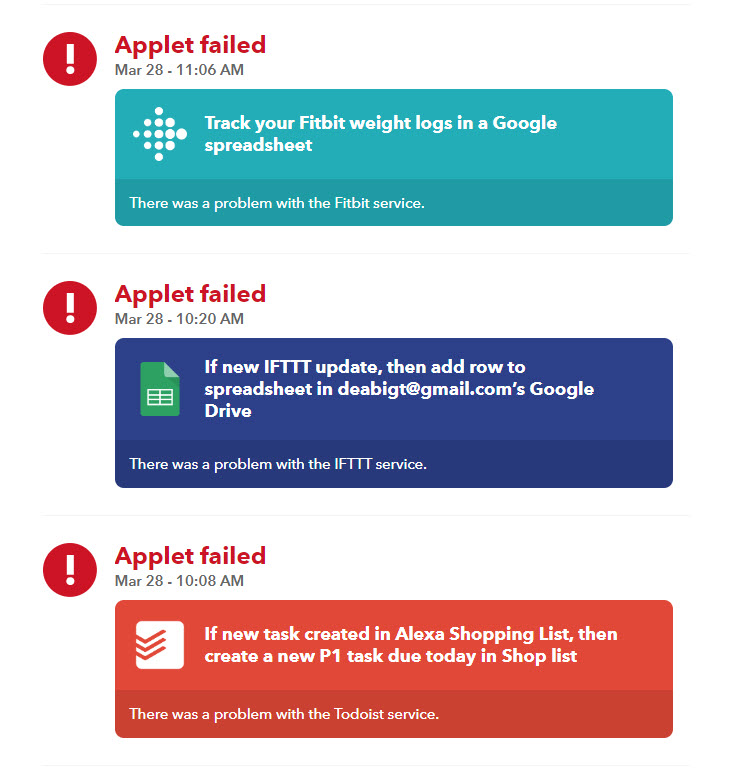
On top of the linkage breaks like Facebook and Google cutting some previously supported features and VeSync for instance just stopping working while still being listed as a service, you can expect many intermittent outages. Some for days at a time. So you should not count on IFTTT. For me it has been getting steadily worse. I have not gone a day without at least one failure in my IFTTT activity log for a long time now. And most of those are automation related. Add to that instances where it thinks it succeeded but did not because it has to assume the receiving service did its job. Keep everything as local as possible if you want any chance of reliability.

Here are some of the recent errors in my activity log in just over 24 hours. This gives a feel for the variety of services affected.


Update: 6/21/2019

Hearing some good things about Olisto but they do not seems to support hubs like SmartThings or Homeseer yet. Might be useful though if you have things on IFTTT that they do support.


Update 1/6/2021

Went ahead and opted for the paid service since I had so many applets doing things that would require my writing web site scrapers to replace and some not even that is an option for. Can't say reliability has improved since it became a paid service though. For example here is my current action log.

Might be time to just give up on these.

Monday, December 10, 2018

Linking TP-Link HS100 Kasa WiFi Smart Plugs to your hub

TP-Link HS100 Kasa WiFi Smart Plug, No Hub Required, Works with Alexa Echo & Google Assistant

I got some of these last year as $5 addons and linked them via IFTTT similar to how I did the Sonoff switches. They have been working fine that way but I came across the article Reverse Engineering the TP-Link HS110 today which shows how to control them locally without a bridge or reflashing the firmware. I definitely sounds easily doable from a program if not a script. Someone already did a Domoticz plugin for tp-link HS100/HS110 smartplug in Python. So I'm putting creating a Homeseer version on my todo list. Assuming someone else does not do it first of course.

Wednesday, November 7, 2018

Sonoff switch linkage to home automation

Hooking up a Sonoff 4 Gang Smart Switch, Interlock Switch for Generator, Inching/Self-locking WiFi & RF Wireless Switch 90~250V AC/ 5~24V DC,Work with Alexa,& Google Home & IFTTT (1-16s delay in inching mode) to Homeseer.

There are other versions of these switches that these instructions will work for too. The single switch unit bought in packs can be way cheaper than this 4 switch unit but are also AC only. In my case I'm wanting to switch individual cameras connected to a single power supply so the above switch is the way to go. Note unlike most WiFi smart switches, these are all inline units meaning you need to connect wires to them.

The most helpful instructions I found To help save time you will also want to know:

Make sure your phone is connected to the 2.4 GHz WiFi you want the Sonoff unit to use.before adding a new switch to the app. Note in this app, this just works. No need to find and connect to WiFi coming from the unit.

Unless you want it to work in the default, only one active relay at a time mode, you need to change the switches.

Remove power from the unit before changing any switches!

You do not need to take the cover off to connect up the relays. There is a hinged hatch but taking the lid off  might make connecting the wires easier. The connections are of the pinch type so smaller gauge wires may not be held well. In most you are probably using 18 ga though which work fine.

Tools you will need:

To get the lid off so you will need a larger phillips screwdriver but with a thin bit so you can get enough torque to turn the tight screws and fit in the small holes to get to them. Something that looks like this.


There is a film cover K5 and K5 that is hard to see but will need to be removed to toggle the switches. You will probably want a good pair of fine point tweezers for this. If the are not sturdy enough to toggle the K5 and K6 switches you may need something else for that.

The switches are tiny.so you may want some sort of magnifying glasses.

Setting the switches:

The text can be a bit confusing. Such as it will say "Toggle to the right" when the pictures are not all the same rotation.

To set it up to turn off on each of the 4 channels separately and immediately the config you want is:
S6 toggled "right" (toward the LEDs)
remove film cover on K5 and K6 switches.
K5 (mode) and K6 (delay) toggle all the switches to 1, ON (toward the terminals.)

Note the yellow tint to the switches. It is from these film covers. (Photographed through magnifying glass.)

Wiring

Hook up your 12 volt wiring like this

I'm using these cables for the wiring.

Software config

Note if this unit loses power it returns all relays to the off position. So for instance if you are using this as a camera power reset you probably want to reverse the actions as in ON in your home automation is "OFF" / NC on the switch. 
Also note a lag of up to a couple seconds in not unusual going through IFTTT. 

Create Homeseer device

First you will want to create a virtual device in Homeseer like this.


Note it might take IFTTT a few minutes to pick up changes so best of create your virtual devices all up front then wait a bit for proceeding.

Link through IFTTT

As with all such IFTTT linkages you will want at least and off and on IFTTT applet for each direction.

First to control the plug when the Homeseer device changes create and applet like this

To get Homeseer to reflect changes to the Sonoff relays by others create applets like this

Note there are other options out there that involve flashing the single switch unit by soldering a USB port to the single switch board to get local control. With the stock firmware I scanned mine and found there are 0 open ports on the unit so reflashing might be the only way to make these cloudless. Though this blog post seems to say you can control one locally by pointing at a local Node.js server as a bridge. Since I'm mainly looking for a cheap way to repower hung cameras on an infrequent basis it seems more than it is worth. If the Sonoff / IFTTT connection starts playing up like the Etekcity one has been then it might be worth looking into.

Thursday, November 1, 2018

Etekcity WiFi Smart Plug

Test Etekcity WiFi Smart Plug, Voltson Mini Outlet with Energy Monitoring (2-Pack), No Hub Required, ETL Listed, White, Works with Alexa, Google Home and IFTTT

So far have not found an API to allow Homeseer to talk to them directly though you can easier connect them via IFTTTNote however I found I needed to reconnect IFTTT to Etekcity at least once so far to get things working again even though no errors seemed to be reported anywhere in the chain. So a heartbeat system might be in order.

Update: 

I did find this sample code for control via Python you might find useful for creating a plugin or bridge. There is no documentation I could find for this API and the examples people have posted seems to vary some but I was able to use it to create a Homeseer VB script documented at the end of this post. While still cloud based it is working as I write (update) this while the IFTTT still appears to be broken over 2 weeks past my original post.

Create Homeseer device

First you will want to create a virtual device in Homeseer. Since this maker supports state change triggers for off. on, online and offline make it dimmable 

and with and status values like this.

Link through IFTTT

Note it might take IFTTT a few minutes to pick up changes so best if create your virtual devices all up front then wait a bit for proceeding.

As with all such IFTTT linkages you will want at least and off and on IFTTT applet for each direction. In this case we will also want a 5th applet to send offline notices back to Homeseer.

First to control the plug when the Homeseer device changes create and applet like this

To go back the other way create on like this

Note about the time I started writing this the IFTTT Etekcity linkage seems to have quit working. Checking back a week later it is still not working.


The hidden API way

As mentioned above I found a very few posts claiming "direct control" (still through Vesync servers) of the plugs. Many refer to hosts and ports that seem to be incorrect or no longer active. But I did get this sample code for control via Python to work.

While you can install python and required modules then modify the scripts to be called from Homeseer events (I did this as a test) you lose logging and remote editing options so I did the work of converting it to VB. vesync.vb us pretty much standalone but I keep all my logins in a seperate file to make sharing easier.

To leverage the above objects in GUIs I created on and off events triggered state change of the matching virtual object (see above). They should look something like this

Lastly add a reset event

Then you can add a rest event to tie it all together. Note since this controls the virtuals and the virtuals trigger controls this works with the IFTTT, API call method or both. My reset events look like this.

Note for triggers I'm using MyMonitor to set Homeseer virtuals based on state info from Blue Iris. You could also use the Blue Iris Plug-In by Highpeak Software plugin. I have multiple Blue Iris servers though and the Highpeak plugin only supports one. Also MyMonitor can run on a seperate PC which can be helpful if load or number of plugins is an issue. Plus of course MyMonitor lets you monitor about anything accessible from the network and it is open source / free to use.

Tuesday, July 11, 2017

First Look: Google Home is still a work in progress

Google Home is not quiet as polished as the Amazon Echo For instance the Echo will search your network for devices while the Home you have to tell it which devices. Homeseer is not supported yet even though it is listed on their web site. Though the Home plug-in for Homeseer is supposed to be ready soon.

The main thing that I bought it for is the one thing it does do that Echo does not. Pass a string to IFTTT. So you can for instance make an applet to log your dreams or ideas you have. And the recognition seems a bit better than Echo too. But do not get too excited because not all actions take a parameter. For instance you can not set up an applet to run any event you say. You still have to do one for each event. Hopefully that will get sorted when the Homeseer plug-in for Home gets released.

Update 8/8/2017

Unfortunately Homeseer still is not linking but I have to say I'm liking this name your own trigger phrase feature more and more. It basically lets you add skills using IFTTT as long as you just want to send a message some where. For instance I used to have an IFTTT applet set up so when I'd add a to-do via Alexa it would get added to my Remember the Milk inbox. The problems were at first that meant using some extra channel to get it from the Amazon list to Remember the Milk. In my case Twitter which meant I got a DM notification every time. Then Remember the Milk got a skill about the same time the trigger word "remember" seemed to stop working. So for example, instead of "Alexa, remember, pick up milk" it became having to say "Alexa, tell Remember The Milk to remind me to pick up the milk at 5pm". I would still need to clear out my Amazon to-do list. Todist on the other hand has a much less polished interface than Remember the Milk BUT it interfaces directly with Amazon so anything I do in my Amazon shopping and to-do lists syncs without any plumbing on my part. So now I can say  "Alexa, add 'pick up the milk' to my to-do list" and get it added without all the notifications.

Now compare that with Google Home. I just create an IFTTT  applet that lets me say "Hey Google, remind me to pick up milk" and it adds it to my Todoist inbox with a priority, due now and a couple tags. The phrasing just flows. Like the memo one above it is nice to be able to pick my own trigger phrase. Note to call an IFTTT from Alexa directly like that you have to say "Alexa, trigger [phrase]" and [phrase] just tells it which applet to run and it does not get passed on. Plus Google Home seems to be better at transcribing text than Alexa. For instance for testing I tried to add "convert homeseer counters to objects". Google got it right. Alexa transcribed it as "for home seer counters".

Updated 10/20/2017

Still can not get Awair or Homeseer to link.

I did get Harmony linked but I can only link in one of the hubs. By default you have to start everything "ask harmony to" as in "Hey Google, ask harmony to turn on hulu". If you want to just say "turn on hulu" like you would do with Alexa then you need to create a shortcut. Note if you have a Chromecast linked by default "turn on Hulu" will try and stream to it. Also when you set up short cuts use the mic to input the shortcut or it may not work. This is a bit more of a pain to set up but it does let you choose what device to play what on though since Fire TV seems to be unsupported in might not make that much difference. Unfortunately you can't just create a shortcut like the "Remind me to" one above but at least you can create a simple one like "to do list" which will bring up the Todoist app which will prompt you from there so you do not have remember which app to bring up and how.

I should probably note here too in order to change the friendly names in Google Home you currently need to unlink and relink Harmony. There is not edit. In Alexa you can edit the names names now of smart home devices, groups and scenes. Scenes is were you will find the friendly names for Harmony activities, channels and devices.

Updated 12/31/2017

After seeing posts in the Homeseer Facebook group claiming it worked with Home I decided to give it another go. This time I did get Homeseer to link accounts and import 83 controls which is short to all of them. It still seems to not grab room info. IIt appears to have pulled in about half of the Hue lights and dimmers (for some reason) on the house hub and none from the shop and barn hubs which my Homeseer knows about. No groups but the all lights on hub. So about 10% of the Hue "things" Homeseer shows. This is fewer than Home pulled from SmartThings months back. (I still have SmartThings hubs for some legacy stuff and experiments.) It does appear to have imported in most (maybe all but hard to tell with so many and the diff in interfaces) Z-wave Switch Binary devices from the 4 networks connected to my Homeseer, my Nest thermostat and virtual devices. It did see the Lifx bulb but not the Ranchio, Harmony hubs, Sonos speakers or Onkyo that are WiFi controlled by my Homeseer. One more point. While linking stuff to rooms I ran into a few problems. When adding a new room the rooms got double added some how. I had to go back and remove the duplicated rooms that had no devices in them. Sometimes adding devices to a room did not save either and I had to go back and link them again. Also it appears you can only add a device to a room. That is fine for filtering lists but if you are grouping for control, which is the case here, that makes it not very useful.

BTW Awair still asks for your login and then just goes back to the devices screen with out error or linking. Tried Lifx and TP-link for first time now that I have a devices to test with and it imported fine. Thought my Nest account was linked but was shows as not so relinked it without issue. Note it took me 3 tries (that Google Home said it understood) before I could turn up the heat on my Nest Thermostat. "Tell Nest to set the temperature to 70" did not seem to actually do anything despite it saying it was doing it. "Set the living room temperature to 70" did seem to work but it could be it just took that long for the first command to make it though all the hops.

For added fun I thought I'd try relinking my Hue account to Home to see if that would allow Home to see the other hubs or just switch hubs to get control of the shop lights. Unfortunately it gets all the way to the final step and flashes a quick message about failing to update. After doing this a few times it did actually update despite the error. But it still only sees the house hub. I'm guessing because when you log into the Hue web interface you can only view one hub (like the official Hue app) and Google goes though the cloud instead of talking directly to the hubs like Alexa does.

Updating devices list

You can now (Dec 2017) say "sync my devices" to Google Assistant (on your phone, Google Home, etc) to refresh all of your smart home services. For example, if you have Philips Hue lights and WeMo outlets, Google will pull the full list of your devices from those services. You can also just refresh a certain category, with something like "sync my lights."

Others thoughts

Granted the landscape is changing fast but here are some articles of where things were at times.

Monday, June 12, 2017

Added Rachio Smart Sprinkler Controller, 8 Zone 2nd Generation


Rachio Smart Sprinkler Controller, 8 Zone 2nd Generation, Works with Amazon Alexa

I bought mine the end of May when they were $50 off which made it as cheap as any of the other I was looking at and it was a done package unlike many of the others. Though some of the others, like OpenSprinker options, looked like they might do more IF you can put in the time. For instance you will probably want to mount it outside which means getting a water proof case. You can get the Rachio Outdoor Enclosure, for 2nd Generation Sprinkler Controller for the Rachio but will need to use something generic for OpenSprinkler like Orbit 57095 Sprinkler System Weather-Resistant Outdoor-Mounted Controller Timer Box Cover. You will also need from valves and a manifold. You can go with something mostly preassembled like Orbit 57253 3-Valve Heavy Duty Preassembled Manifold but the downside of this is the valves have connectors that are proprietary so you are locked in. I went with Orbit 57280 Female Pipe Threaded Auto Inline Sprinkler Valve, 3/4" that left all my options open down the road. I also used unions to make them simple to swap out. I also added a dump valve at the bottom so I can easily drain the system in the winter.


Some of the other bits:

Dixon BA776 Brass Fitting, Adapter, 3/4" GHT Male x 3/4" NPTF Male
Dixon BMA976 Brass Fitting, Adapter, 3/4" GHT Female x 3/4" NPTF Male
Homewerks Worldwide 1-in dia PVC SCH 40 Union
AMERICAN VALVE 1-in PVC Sch 40 Socket In-Line Ball Valve
LASCO 1-in Dia x 3/4-in Dia PVC Sch 40 Bushing
LASCO 1-in Dia x 3/4-in Dia PVC Sch 40 Adapter (not pic on website is 3/4 to 3/4 as of this writing)
Charlotte Pipe 5-Pack 1-in dia PVC Sch 40 Tees
LASCO 1-in Dia 90-Degree PVC Sch 40 Slip Elbow
1-in x 10-ft 450 Schedule 40 PVC Pipe
Yardsmith Yardsmith Zinc Goose Neck Hose Connector
Blue Hawk 0.6-in x 43-ft Plumber's Tape

In the end 4 zone's worth of plumbing will set you back another $150 or so.

Some screen shots

This is what the web dashboard looks like
There is a ton of info here. The calendar shows the days it is planning on watering, weather info, several types of histories and your zones. clicking on a zone lets you set a bunch of parameters to dial in the best water usage calculations. Note it only calculates water savings with fixed schedules with weather intelligence enabled. Flex gives you the best saving and moisture optimization but it also kind of makes it hard to compare since it has no idea what your old schedule was. What you need to do is look at how much water you are using per minute in the watering history. In my case that appears to be about 2.15 gallons per minute (my zone 4 uses about 1/3 the gallons/minute the others do but lets keep it simple). Say my old system watered each zone for 10 minutes a day every other day. So at the end of 8 days it watered for 40 minutes times 4 days or 160 minutes. At the end of 8 days you can see how many minutes it watered, take the difference and multiple that times you gallons/minute to see what you saved. Granted it would be nice if they let you input that in your preferences so they could calculate it for you.


You can even add a customized sprinkler type. I found the Precip Rate for a soaker hose in one of the forums.
Note it appears you can only edit a Custom Nozzle via the phone app and can not remove them in either interface. Otherwise the phone app has similar functionality though the layout is different.

One thing I should point out is the blue icon in the lower right. This brings up a remote for manual control.

This is mainly useful in the phone app for testing and turning off the sprinklers when you are in the garden doing stuff.

Why would I want this over a simple timer setup?

The big thing is Flex watering that takes weather, soil type, sprinkler type and area covered into account. Instead of watering a zone for a set amount of time then the next, it calculates how much water should be needed given all the factors them divides that into sub cycles and rotates watering the zones to reduce run off. This might make getting accidentally hit by unexpected watering more likely but should reduce water usage and keep the plants at optimal moisture levels.

Then there are all the integrations.


First off you can link into a near by PWS weather station. If you have one that can upload data to PWS Weather you can tie it straight in. For instance for Netatmo or if you have a Meteobridge. I have my Meteobridge connect Davis Vue linked. They suggest using a pro station near by but out here in the hills that station could be flooding while I'm bone dry and vice versa. There were a few personal stations within a mile or so of me but since I have 3 weather stations online I know how accurate mine are being.

Alexa has a skill to talk directly to it so you can override the watering. With flex watering this can come in real handy. It also supports Google Home.

It talks to Nest which it is supposed to turn on the sprinklers if your Nest Protect senses a fire.

Of course there is IFTTT integration which lets you talk to lots of things. 

Homeseer can talk to it directly with the ultrarachio3 HSPI plugin. The plugin creates 55 devices (with 8 zone Rachio) that lets you monitor and control everything. Note triggering a Homeseer event via IFTTT versus this plugin appears to be about 10 minutes behind the plugin. So the plugin might well be telling you that watering has stopped before IFTTT has told you is has begun. 

It also talks directly to SmartThings. Detailed instruction for that can be found here.

I'm not seeing anyway to make it work Vera. It is a Wi-Fi interface though so that is pretty much expected. Same goes for the closed Lowes Iris system. Rachio does have a public API though so you could probably cook your own if you have the time.

Next step move my Davis soil moisture sensors to match the new zones and get the main unit better sun exposure. That will let me better tweak the settings and monitor for problems.

Friday, March 3, 2017

New Amazon Echo Skills!!!

I went into the Alexa app to link to my Harmony since the Harmony / Homeseer link has been a bit iffy lately and OMG the stuff that has been added since I last looked! 23 PAGES of just smart home / automation type skills alone. Wireless Tag even has a skill now.  I hear Vera is planning to have a skill soon. They look to be one of the few that does not have a skill already so they better get moving.  I only have my Harmony, Nest, SmartThings (as backup Hue channel) and Homeseer devices linked up. The Wireless Tag skill is only useful for changing settings and how often do you need that? That gives me 109 devices connected to my Echo now. Note if you want to trigger Homeseer events you still need to use the IFTTT skill. One complaint though Amazon still does not seem to realize their success yet. When you go into a group to assign devices for instance, they appear to have no order to them which makes grouping a few of 109 devices a bit more of an adventure than it ought to be. I did get a group created to turn on every connected light in the house and shop so I can turn them all off or on. I already have an event setup to turn on all exterior lighting which brings the up in groups. Can't wait till dark to see what the lag time is and if they all come up at once. I also created a group called fan since it could not seem to deal with Mbed_fan as a name. Having to rethink names of some of the Harmony linked devices too so I can avoid confusion.

Tuesday, October 18, 2016

FB October 18, 2016

just posted this response elsewhere and thought I should post it here so it is easy to find when asked again later.
A LOT of depends on what hub is right for you. So far I've BOUGHT and installed, in order, SmartThingsVera Control, Ltd.Iris by Lowe's, Hue, 3 more Veras, Amazon Echo and HomeSeer Home Automation to replace my X10 based system first installed in the 1990s. Vera can be easier to do simple stuff like turn on a fan when it is warm cause everything is an app in SmartThings. If there is one already that does what you want, great, if not you need to write one. Vera mainly uses a wizard of if this or that happens do this. You only write code for "complex" stuff like this AND this happens do this. Both Vera and SmartThings seem to be having a lot of stability issues lately. So much so I looked into Homeseer. Homeseer can do if this and/or that happens do this which is a bit simpler than Vera but the interface is aimed at installers not end users. They assume you will create an end user interface if needed with an optional designer tool. I'm a long time developer so the basic Homeseer interface is fine for me. It is way more expensive than than SmartThings or Vera though. That said, I now have moved all my day to day stuff onto Homeseer, shutdown my all my Veras and am just using SmartThings as a backup channel to my Hue lights. Homeseer also allows you to have and control multiple z-wave networks from one hub over Ethernet. For instance I can control my house and shop from in one screen now and do things like turn off or on all the lights in both places with one command. No matter what you go with I'd suggest you try and stay with devices that work with most hubs. One of the things I really like about Hue lighting is they will connect to multiple hubs at the same time. I would avoid anything that wants a monthly fee like Lowes Iris. (Iris has a bunch of other issues too. AVOID.) Read reviews! I would try and minimize having to go to the net for stuff too. For example another selling point for Homeseer to me is local login and actions. Other than IFTTT interactions of course. (Note Vera has no IFTTT or Echo support. Homeseer and SmartThings do.) SmartThings is mostly in the cloud and even Vera wants you to log on via their web site. You also might want to think about install base. Google some of the things you want to control and see how others have done it on the hubs you are thinking about. In the end you will probably end up having to write at least some code once you get into things deep enough so you should look at those interfaces and see which make sense to you. Oh one last thing, think about how the hub / interface will handle a hundred or more devices even if you only plan to do a few things. Most of the interfaces seem to be made for a dozen or two devices at most without getting slow and/or clumsy to use beyond that. You will be amazed how many things you end up adding after you get started. My current Homeseer is monitoring and / or controlling 678 things including monitoring 17 UPSs. And I'm not close to done yet! (Note a single device like an Aeon 4in1 sensor counts as 4 to 5 things depending on the interface.)

HomeSeer Home Automation Nice write up and comparison chart! A couple comments... our systems are compatible with the Mimo product from FortrezZ and there are 2 plug-ins available for Insteon and X10 too. I would recommend replacing the "Z-Stick S2" with a SmartStick+ or Z-Wave.me UZB for performance comparable to the Z-NET. Anyway, well done! 

 Round Mountain Rescue Ranch Yeah I did hook up the FortrezZ to my Homeseer but the reaction time seems so poor no matter what hub it is on I've abandoned it for a Raspberry Pi / PiFace solution I'm trying to work the bugs out of. Fortunately that is an option with Homeseer