Showing posts with label Smart Plugs. Show all posts

Saturday, August 15, 2020

Simple automation controlled siren

 I see posts from time to time wanting a siren controlled by home automation. I tried several "home automation" sirens but they were all feeble. For instance:

Dome Home Automation DMS01 Wireless Z-Wave Battery-Powered Home Security Siren and Chime, White

Aeotec Siren Gen5, Z-Wave Plus, 105dB Siren with Strobe alerts, Plug-in, Backup Battery

What I was looking for was something to encourage any critters that found their way into the shop to leave so needed something LOUD. What I found was the Honeywell Ademco 748 119db Dual-Tone Siren


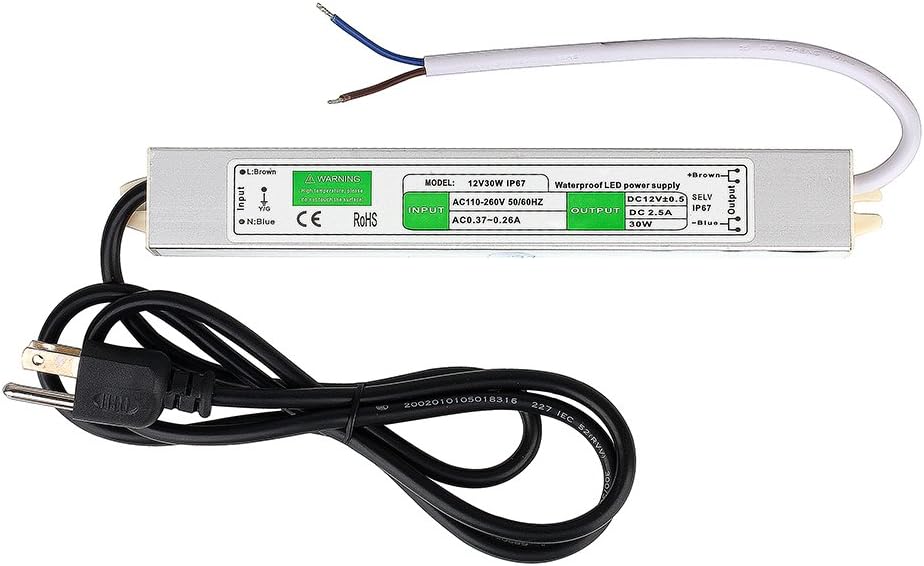
You do not want to be in the room with this going off without ear protection. To power it I'm using the BINZET DC12V 2.5A 30 Watt LED Power Supply Driver Transformer AC 120V-130V to DC 12V 2.5A Output Voltage Convertor LED Strip Low Voltage Powered LED Light Regulator


All you then need is to stick it into any smart plug you have. The Etekcity WiFi Smart Plugs are a cheap and simple solution for it. The VeSync app makes it simple to control without automation too.


Sunday, December 30, 2018

Wemo local control from Homeseer

Wemo Mini Smart Plug, WiFi Enabled, Works with Alexa, Google Assistant & Apple HomeKit

3Camel price chart

Got a couple of these for half price on Good Friday looking for another cheap option to reset cams and such. I also wanted something I could control locally unlike the Etekcity and Sonoff options which Wemo is supposed to do.

What did not work

First I tried the Eric Fetty Wemo Software Plug-in for HS3 This appears to integrate well from past reviews but for some reason seems to have stopped working for some like me. I could never get it to discover the plugs.  Trying to debug lead me to the github project palominolabs/belkin-wemo-switch then cybergarage/cybergarage-upnp. After some playing around with these I found it only discovered the Wemo plugs intermittently. I looked a few others. Most of them wanted to set up some sort of bridge server.

Getting a working interface

Then I came across agilemation/Belkin-WeMo-Command-Line-Tools. The only "downside" seems to be it uses linux shell scripts byt installing cygwin will get around that. When you install cygwin be sure to get the curl command. Of course you could reverse engineer this to make the HTTP calls but calling from Homeseer is simple enough to make the effort seem like a waste. So here is what I did:
Install cygwin (including curl)
Install npm via Node.js
Make a folder for the projects. I put mine in C:\npm
cd c:\npm
Run the command
npm install belkin-wemo-command-line-tools
The new commands are in C:\npm\node_modules\belkin-wemo-command-line-tools
in C:\npm I created a bat command containing

cd C:\npm\node_modules\belkin-wemo-command-line-tools
C:\cygwin\bin\sh wemo -h %1 -a %2

Now you have a simple command with the syntax of wemo ip_of_switch ON_or_OFF

Linking to Homeseer

First you need to create a virtual similar to those outlined in this post.
Then you just need to setup a couple events to trigger on the state change of that virtual similar to these.
In this case 10.10.1.141 is the IP address of my first Wemo switch.

Note you could also create scripts to get state, signal strength and name info and even set the name of the plug. Though at that point reverse engineering the shell script into VB might be worth the effort.

Monday, December 10, 2018

Linking TP-Link HS100 Kasa WiFi Smart Plugs to your hub

TP-Link HS100 Kasa WiFi Smart Plug, No Hub Required, Works with Alexa Echo & Google Assistant

I got some of these last year as $5 addons and linked them via IFTTT similar to how I did the Sonoff switches. They have been working fine that way but I came across the article Reverse Engineering the TP-Link HS110 today which shows how to control them locally without a bridge or reflashing the firmware. I definitely sounds easily doable from a program if not a script. Someone already did a Domoticz plugin for tp-link HS100/HS110 smartplug in Python. So I'm putting creating a Homeseer version on my todo list. Assuming someone else does not do it first of course.

Wednesday, November 7, 2018

Sonoff switch linkage to home automation

Hooking up a Sonoff 4 Gang Smart Switch, Interlock Switch for Generator, Inching/Self-locking WiFi & RF Wireless Switch 90~250V AC/ 5~24V DC,Work with Alexa,& Google Home & IFTTT (1-16s delay in inching mode) to Homeseer.

There are other versions of these switches that these instructions will work for too. The single switch unit bought in packs can be way cheaper than this 4 switch unit but are also AC only. In my case I'm wanting to switch individual cameras connected to a single power supply so the above switch is the way to go. Note unlike most WiFi smart switches, these are all inline units meaning you need to connect wires to them.

The most helpful instructions I found To help save time you will also want to know:

Make sure your phone is connected to the 2.4 GHz WiFi you want the Sonoff unit to use.before adding a new switch to the app. Note in this app, this just works. No need to find and connect to WiFi coming from the unit.

Unless you want it to work in the default, only one active relay at a time mode, you need to change the switches.

Remove power from the unit before changing any switches!

You do not need to take the cover off to connect up the relays. There is a hinged hatch but taking the lid off  might make connecting the wires easier. The connections are of the pinch type so smaller gauge wires may not be held well. In most you are probably using 18 ga though which work fine.

Tools you will need:

To get the lid off so you will need a larger phillips screwdriver but with a thin bit so you can get enough torque to turn the tight screws and fit in the small holes to get to them. Something that looks like this.


There is a film cover K5 and K5 that is hard to see but will need to be removed to toggle the switches. You will probably want a good pair of fine point tweezers for this. If the are not sturdy enough to toggle the K5 and K6 switches you may need something else for that.

The switches are tiny.so you may want some sort of magnifying glasses.

Setting the switches:

The text can be a bit confusing. Such as it will say "Toggle to the right" when the pictures are not all the same rotation.

To set it up to turn off on each of the 4 channels separately and immediately the config you want is:
S6 toggled "right" (toward the LEDs)
remove film cover on K5 and K6 switches.
K5 (mode) and K6 (delay) toggle all the switches to 1, ON (toward the terminals.)

Note the yellow tint to the switches. It is from these film covers. (Photographed through magnifying glass.)

Wiring

Hook up your 12 volt wiring like this

I'm using these cables for the wiring.

Software config

Note if this unit loses power it returns all relays to the off position. So for instance if you are using this as a camera power reset you probably want to reverse the actions as in ON in your home automation is "OFF" / NC on the switch. 
Also note a lag of up to a couple seconds in not unusual going through IFTTT. 

Create Homeseer device

First you will want to create a virtual device in Homeseer like this.


Note it might take IFTTT a few minutes to pick up changes so best of create your virtual devices all up front then wait a bit for proceeding.

Link through IFTTT

As with all such IFTTT linkages you will want at least and off and on IFTTT applet for each direction.

First to control the plug when the Homeseer device changes create and applet like this

To get Homeseer to reflect changes to the Sonoff relays by others create applets like this

Note there are other options out there that involve flashing the single switch unit by soldering a USB port to the single switch board to get local control. With the stock firmware I scanned mine and found there are 0 open ports on the unit so reflashing might be the only way to make these cloudless. Though this blog post seems to say you can control one locally by pointing at a local Node.js server as a bridge. Since I'm mainly looking for a cheap way to repower hung cameras on an infrequent basis it seems more than it is worth. If the Sonoff / IFTTT connection starts playing up like the Etekcity one has been then it might be worth looking into.

Thursday, November 1, 2018

Etekcity WiFi Smart Plug

Test Etekcity WiFi Smart Plug, Voltson Mini Outlet with Energy Monitoring (2-Pack), No Hub Required, ETL Listed, White, Works with Alexa, Google Home and IFTTT

So far have not found an API to allow Homeseer to talk to them directly though you can easier connect them via IFTTTNote however I found I needed to reconnect IFTTT to Etekcity at least once so far to get things working again even though no errors seemed to be reported anywhere in the chain. So a heartbeat system might be in order.

Update: 

I did find this sample code for control via Python you might find useful for creating a plugin or bridge. There is no documentation I could find for this API and the examples people have posted seems to vary some but I was able to use it to create a Homeseer VB script documented at the end of this post. While still cloud based it is working as I write (update) this while the IFTTT still appears to be broken over 2 weeks past my original post.

Create Homeseer device

First you will want to create a virtual device in Homeseer. Since this maker supports state change triggers for off. on, online and offline make it dimmable 

and with and status values like this.

Link through IFTTT

Note it might take IFTTT a few minutes to pick up changes so best if create your virtual devices all up front then wait a bit for proceeding.

As with all such IFTTT linkages you will want at least and off and on IFTTT applet for each direction. In this case we will also want a 5th applet to send offline notices back to Homeseer.

First to control the plug when the Homeseer device changes create and applet like this

To go back the other way create on like this

Note about the time I started writing this the IFTTT Etekcity linkage seems to have quit working. Checking back a week later it is still not working.


The hidden API way

As mentioned above I found a very few posts claiming "direct control" (still through Vesync servers) of the plugs. Many refer to hosts and ports that seem to be incorrect or no longer active. But I did get this sample code for control via Python to work.

While you can install python and required modules then modify the scripts to be called from Homeseer events (I did this as a test) you lose logging and remote editing options so I did the work of converting it to VB. vesync.vb us pretty much standalone but I keep all my logins in a seperate file to make sharing easier.

To leverage the above objects in GUIs I created on and off events triggered state change of the matching virtual object (see above). They should look something like this

Lastly add a reset event

Then you can add a rest event to tie it all together. Note since this controls the virtuals and the virtuals trigger controls this works with the IFTTT, API call method or both. My reset events look like this.

Note for triggers I'm using MyMonitor to set Homeseer virtuals based on state info from Blue Iris. You could also use the Blue Iris Plug-In by Highpeak Software plugin. I have multiple Blue Iris servers though and the Highpeak plugin only supports one. Also MyMonitor can run on a seperate PC which can be helpful if load or number of plugins is an issue. Plus of course MyMonitor lets you monitor about anything accessible from the network and it is open source / free to use.